v1
latestOpenAPI 3.1.02026-07-2419603.1 MBAnalytics
Execute query
API that allows querying the database directly. Please note that each request must be authenticated.
Copy definition
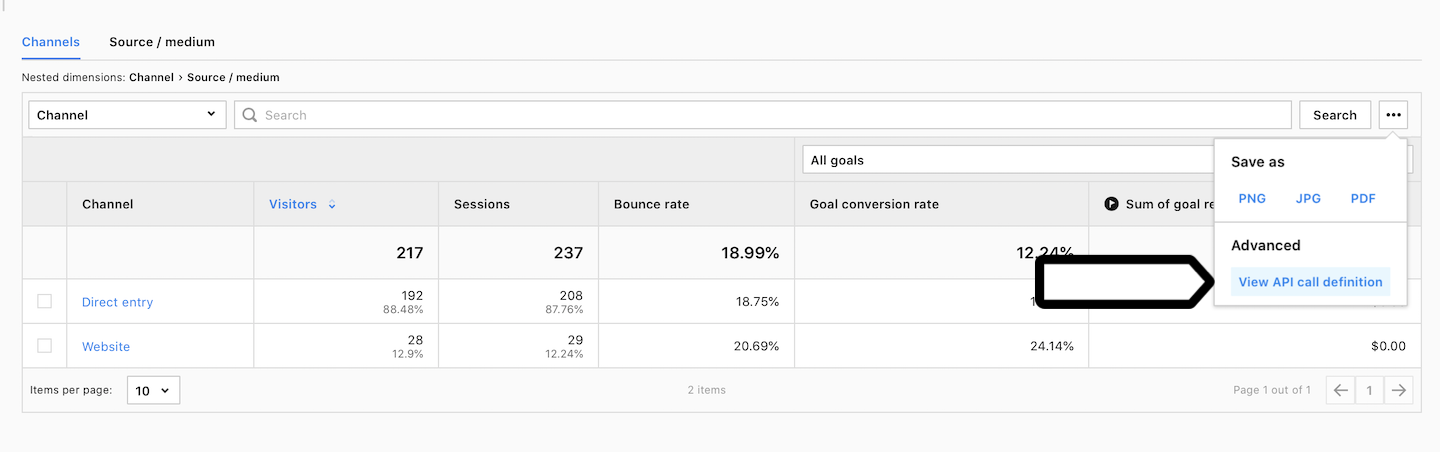
You can use the View API call definition option available in Analytics module in each report to get more usage examples based on your existing reports.
Compression
When requesting large amount of data, make sure to include an Accept-Encoding: gzip header to enable compression.
Cache
Please note that all query results are cached for 10 minutes.
post/api/analytics/v1/query/
Request body
Example request
{
  "website_id": "70236925-724f-404e-b634-7b5633bc0bcc",
  "columns": [
    {
      "column_id": "device_type"
    },
    {
      "column_id": "revenue",
      "transformation_id": "sum"
    }
  ],
  "date_from": "2020-02-10",
  "date_to": "2020-02-10",
  "filters": {
    "operator": "and",
    "conditions": [
      {
        "column_id": "event_title",
        "condition": {
          "operator": "contains",
          "value": "test"
        }
      }
    ]
  },
  "metric_filters": {
    "operator": "and",
    "conditions": [
      {
        "column_id": "page_views",
        "condition": {
          "operator": "eq",
          "value": 42
        }
      }
    ]
  },
  "offset": 0,
  "limit": 100,
  "order_by": [
    [
      0,
      "desc"
    ],
    [
      1,
      "asc"
    ]
  ],
  "format": "json",
  "options": {
    "sampling": 0.2
  }
}
Response
OK
Example response
{
  "data": [
    [
      [
        1,
        "Smartphone"
      ],
      0
    ],
    [
      [
        0,
        "Desktop"
      ],
      0
    ]
  ],
  "meta": {
    "columns": [
      "device_type",
      "revenue__sum"
    ],
    "scope": "event",
    "blended_datasets": [],
    "count": 2
  }
}