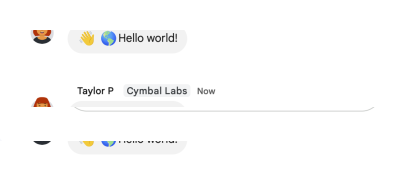
Creates a message in a Google Chat space. For an example, see Send a message. Supports the following types of authentication: - App authentication with the authorization scope: - https://www.googleapis.com/auth/chat.bot - User authentication with one of the following authorization scopes: - https://www.googleapis.com/auth/chat.messages.create - https://www.googleapis.com/auth/chat.messages - https://www.googleapis.com/auth/chat.import (import mode spaces only) Chat attributes the message sender differently depending on the type of authentication that you use in your request. The following image shows how Chat attributes a message when you use app authentication. Chat displays the Chat app as the message sender. The content of the message can contain text (text), cards (cardsV2), and accessory widgets (accessoryWidgets). 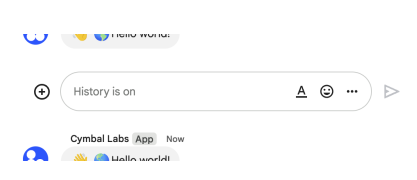 The following image shows how Chat attributes a message when you use user authentication. Chat displays the user as the message sender and attributes the Chat app to the message by displaying its name. The content of message can only contain text (text).
  The maximum message size, including the message contents, is 32,000 bytes. For webhook requests, the response doesn't contain the full message. The response only populates the name and thread.name fields in addition to the information that was in the request.
Path parameters
Required. The resource name of the space in which to create a message. Format: spaces/{space}
Query parameters
The notification type for the message.
Optional. A custom ID for a message. Lets Chat apps get, update, or delete a message without needing to store the system-assigned ID in the message's resource name (represented in the message name field). The value for this field must meet the following requirements: * Begins with client-. For example, client-custom-name is a valid custom ID, but custom-name is not. * Contains up to 63 characters and only lowercase letters, numbers, and hyphens. * Is unique within a space. A Chat app can't use the same custom ID for different messages. For details, see Name a message.
Optional. Specifies whether a message starts a thread or replies to one. Only supported in named spaces. When responding to user interactions, this field is ignored. For interactions within a thread, the reply is created in the same thread. Otherwise, the reply is created as a new thread.
Optional. A unique request ID for this message. Specifying an existing request ID returns the message created with that ID instead of creating a new message.
Optional. Deprecated: Use thread.thread_key instead. ID for the thread. Supports up to 4000 characters. To start or add to a thread, create a message and specify a threadKey or the thread.name. For example usage, see Start or reply to a message thread.
Request body
Response
Successful response